What you will have at the end
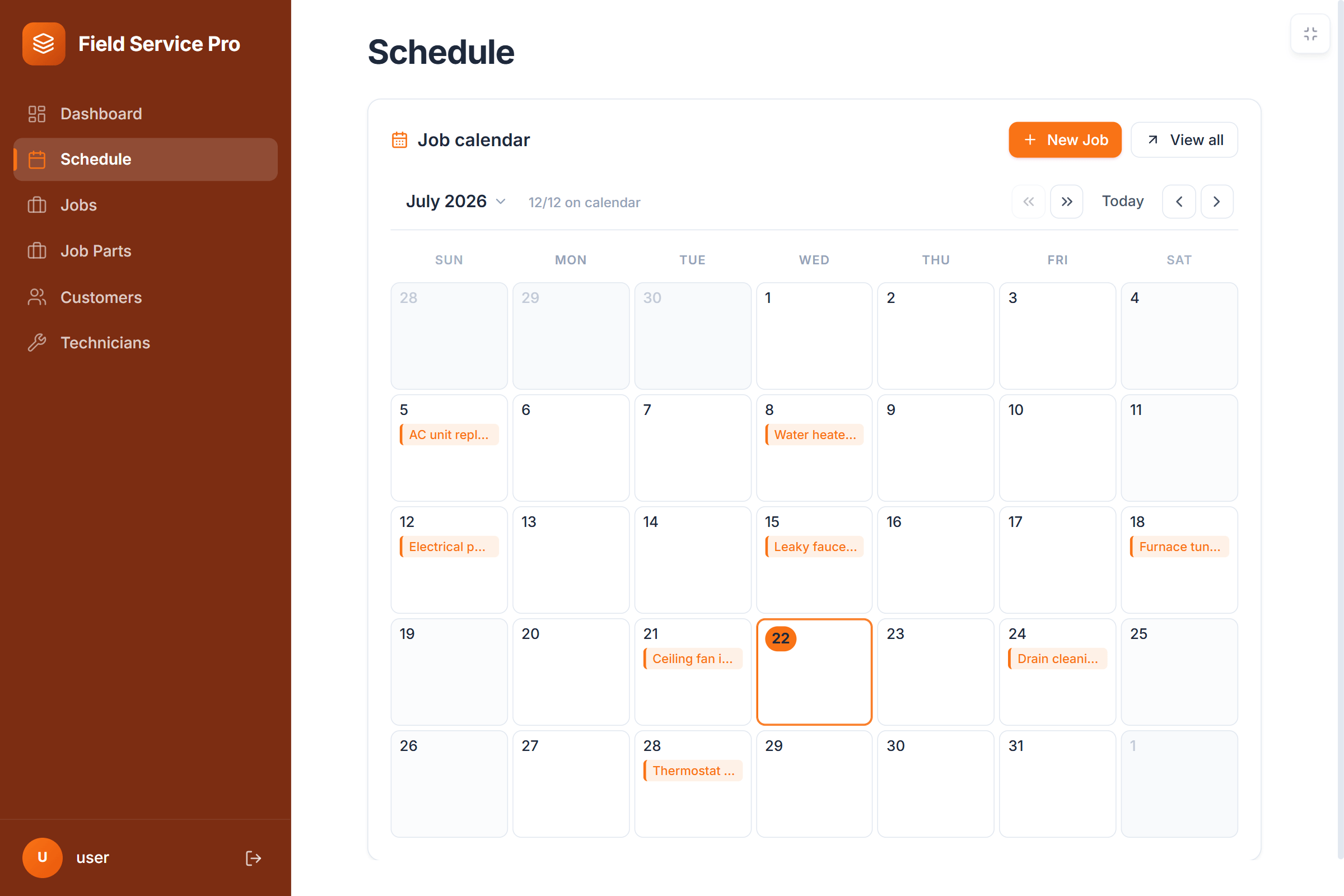
- A schedule calendar your office and technicians both work from, on any phone.
- Profit and margin on every job, from quoted price, labor hours and parts.
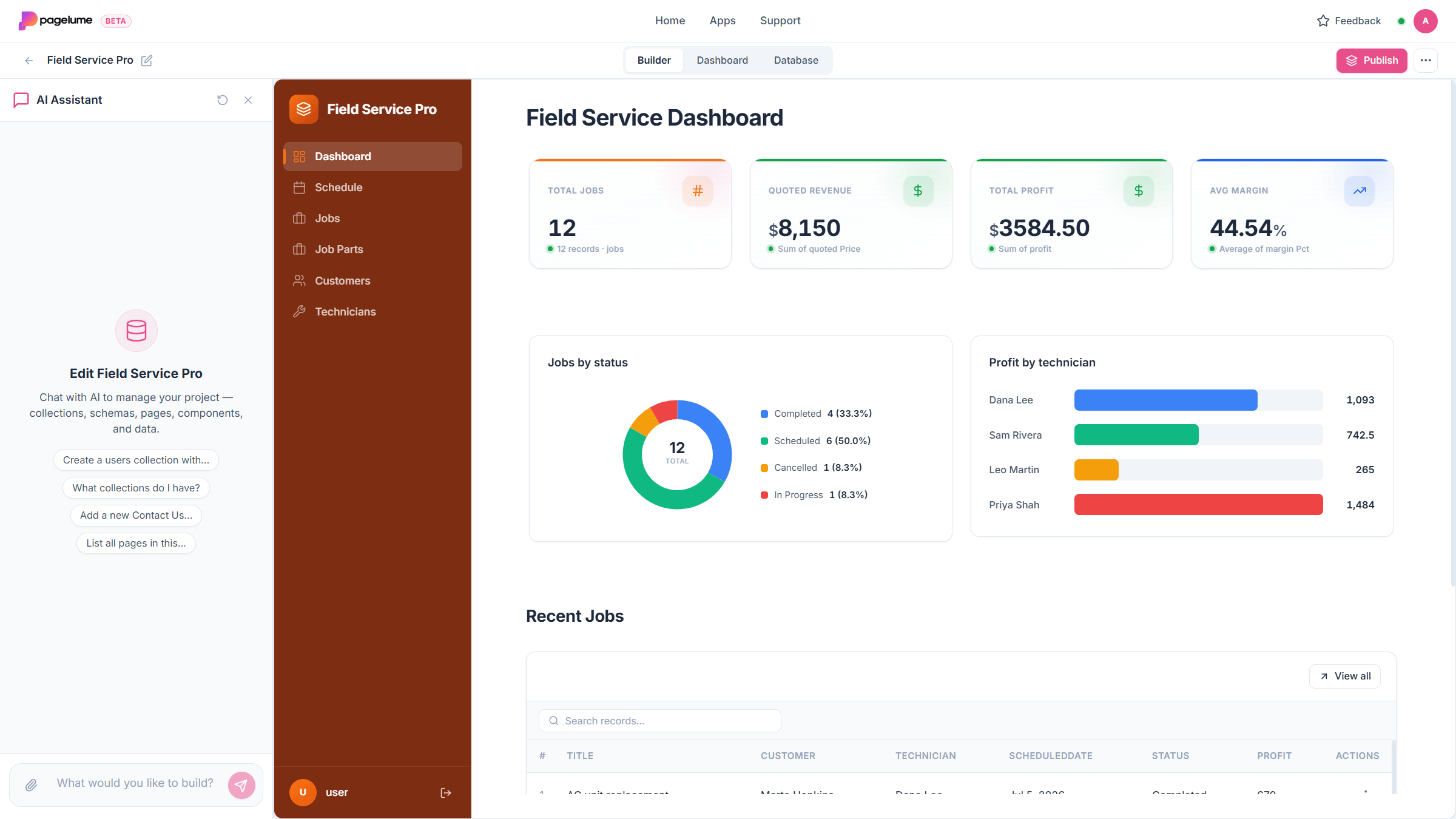
- A dashboard with total profit, average margin and profit by technician for the month.
The problem with a calendar and a bank balance
A shared calendar tells you where everyone is. Your accounting software tells you, weeks later, what came in and went out. Neither one tells you that the Thursday boiler job lost money because it took two extra hours and a part you forgot to bill.
To know profit per job you need four things on the same record: what you quoted, how many hours it took and what those hours cost you, which parts you used, and who did the work. Keep those together and the rest is arithmetic the app can do for you.
Step 1Start from the Field Service Pro template
After you sign in, open Templates and choose Field Service Pro. It copies a complete app into your account in a few seconds, with sample jobs so you can see how it behaves before you type anything. Using a template spends no AI credits.
Here is what you get:
- Customers: name, phone, email, address.
- Technicians: name, specialty, phone, and an hourly cost. The hourly cost is what makes labor cost real.
- Jobs: title, customer, technician, scheduled date, status (Scheduled, In Progress, Completed, Cancelled), priority, quoted price, labor hours, labor cost, parts cost, total cost, profit and margin.
- Job Parts: part name, quantity, unit cost, and a line total, linked to the job.
- A Schedule page with a month calendar of jobs, and a Dashboard with total jobs, quoted revenue, total profit, average margin, jobs by status and profit by technician.
Prefer your own words? Describe the business instead
If your trade has its own vocabulary (units instead of jobs, crews instead of technicians) type a sentence into the create box and Lume sets up an app around it. This path uses a few AI credits. Press the button below the prompt to start with it already filled in.
Set up a jobs app for my plumbing business: customers, technicians with an hourly cost, jobs with quoted price, labor hours, parts and profit, a schedule calendar, and a dashboard with profit by technician.
Step 2Put in your technicians and your regular customers
Open Technicians and add each person with an hourly cost. Use what an hour of their time costs you, wages plus the usual on-costs, because labor cost on every job is hours multiplied by this number. Getting it roughly right matters more than getting it exact.
Then add the customers you already know. New ones can be added from the job form later. If they live in a spreadsheet, attach it in the Lume chat and ask for the rows to be added to Customers.
Bring customers in from a spreadsheet
Attach the file in the Lume chat inside the app and name the tab and the list so there is no guessing. About 200 rows per tab per upload are read, so a long list goes in a few batches.
Add every row from the Customers tab to the Customers list. Skip blank rows.
Step 3Book a job
Open Jobs and press New job. Pick the customer and technician from the dropdowns, set the scheduled date, type the quoted price, and save. The job appears on the Schedule calendar on that date and on the dashboard as a scheduled job. That is the whole booking.
Make booking even faster
If the office books most jobs from the dashboard, ask Lume for a button there. You can also make fields required so a job can never be saved without a date or a customer.
Add an "Add job" button to the dashboard, and make Customer, Technician and Scheduled date required on the job form.
Step 4Log hours and parts, and watch the profit fill in
When the job is done, the technician (or the office) opens it, enters the labor hours, adds the parts used to Job Parts with quantity and unit cost, and moves the status to Completed. The template does the rest on the job record:
- Labor cost is labor hours multiplied by the technician's hourly cost.
- Parts cost is the sum of the line totals in Job Parts for that job.
- Total cost is labor cost plus parts cost.
- Profit is quoted price minus total cost, and margin is profit as a percentage of the quoted price.
Nobody types a formula and nobody can overwrite one by accident. If a part was forgotten, add it a week later and the profit updates.
Add travel or callout to the cost
One sentence to Lume is enough. Confirm the change when it shows you the update; you can undo it with one click.
Add a "Travel cost" number field to Jobs and include it in total cost, profit and margin.
Step 5Run the day from the dashboard
The dashboard already answers the weekly questions: how many jobs, how much was quoted, what the profit is, what the average margin is, and which technician is bringing in the most. Two additions make it a daily tool as well.
Today and overdue at the top
An overdue job is one whose scheduled date has passed and whose status is still Scheduled or In Progress. Ask for both lists on the dashboard.
At the top of the dashboard add two lists: jobs scheduled for today, and overdue jobs (scheduled date in the past and status not Completed or Cancelled).
Low-margin jobs
This is the list that changes how you quote. Jobs under a margin you choose, sorted worst first.
Add a list of completed jobs this month with a margin below 20 percent, lowest margin first.
Step 6Give your technicians a login
Open Settings and invite each technician by email with the Editor role. Editors can open jobs, log hours and parts and change the status, but they cannot delete records or change settings. Give the office Admin. Then publish the app at its own web address and send everyone the link; it works in the phone browser with nothing to install.
Step 7Ask Lume instead of building reports
Lume sits inside the live app and can read your records. Instead of adding a page for every question, ask it. It answers from your real data and can draft a new job or a change for you to confirm.
- "Which technician made the most profit this month?"
- "How many jobs did we complete for Northside Dental this year, and what was the total quoted?"
- "Which parts did we use most often in September?"
Try a profit question on your own data
Once a few real jobs are logged, ask this and confirm the numbers against a job you know well.
Which technician made the most profit this month, and what was their average margin?
Common questions
Can technicians update jobs from their phone?
Yes. Publish the app and share the link. It opens in the phone browser, technicians sign in with the login you invited them with, and they can change status, enter hours and add parts on site. Nothing needs installing.
Is profit really calculated automatically?
In the Field Service Pro template, labor cost, parts cost, total cost, profit and margin are calculated fields on each job. You enter the quoted price, the labor hours and the parts used, and the rest updates on its own.
Can I send customers a reminder before the job?
Email automations exist in Pagelume (for example a message a day before the scheduled date) and are switched on per account. Contact us at contact@pagelume.com and we will enable them for you.
Does it do invoices?
Every record can be downloaded as a PDF, and Lume can create a PDF template for a quote or invoice using your job fields. Full invoicing with payments is better left to your accounting software; the profit tracking here tells you what to invoice and what it cost you.
What does it cost?
Pagelume is free to start with 100 AI credits a month and no credit card. Starting from the template, adding records, inviting people and editing by hand use no credits. Credits are spent when Lume builds or changes something or answers a question inside the app.
I already have a jobs spreadsheet. Can I bring it in?
Yes. Attach it in the Lume chat inside the app and ask for the rows of a tab to be added to Jobs or Customers. About 200 rows per tab per upload are read, so a long history goes in a few batches. Or start from the spreadsheet guide and build the app from the file itself.